
All articles
Help Center Getting started
Find a cocktail
Browse the library from Home, then narrow any list by strength, method or zero-proof, and sort it the way you like.
The Home tab is the front door to Sakaba’s 1,000 recipes. Scroll down from the cocktail of the day to browse by taste, by collection or by spirit, then narrow any list with the strength bar and the filter menu.
What’s on Home
From top to bottom:
- Cocktail of the day. One drink picked for the day, with its method and strength. Tap it to open the recipe. Below it,
Surprise mepicks a drink for you; see Shake to mix. - Your bar. A row that changes with your bar. With nothing ticked it reads
Stock your barand takes you to My Bar to add bottles. Once you’ve ticked some, it readsReady in your barwith how many drinks you can make, orAlmost thereif you need a few more bottles. When some of those drinks need Plus, it shows two numbers, such as “62 cocktails — 17 available”: everything your bar can make, then how many of those you can open. See What can I make. - By taste.
Sour,Sweet,Bitter,BoozyandBalancedeach open a list of drinks with that profile. - Collections. Curated shelves like
Modern Classics,TikiandBrunch, led by one that changes with the season. See Collections and seasonal shelves. - The spirit grid.
All cocktailsfirst, then the 15 spirits from Gin to Non-Alcoholic, each with a count. - Bar basics. Glassware, techniques, garnishes and a glossary. See Bar basics.
A spirit’s list includes every recipe that uses that spirit, not only the ones filed under it. A Long Island Iced Tea, for example, appears under several spirits, so the counts on the grid add up to more than 1,000.
Read a list
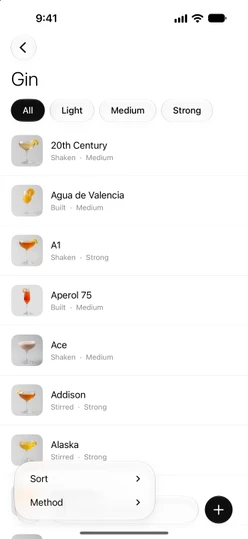
Each row shows the drink’s name and its method and strength, such as “Shaken · Strong”. In All cocktails the row leads with the spirit instead. A few extra marks can appear:
- A rating with a star, such as “4.5 ★”: the average of your own journal ratings for that drink.
- A filled heart: it’s one of your favorites.
- A ✨ sparkle: the recipe needs Sakaba Plus.
Tap a row to open the recipe. Tapping a ✨ recipe without Plus opens a small Recipe is part of Sakaba Plus card with an Unlock with Plus button instead. See Free vs. Plus.
Narrow a list
Every list (a spirit, All cocktails, a taste, a collection) has the same tools.
- Strength bar. At the top:
All,Light,Medium,Strong. Only the strengths present in that list appear. - Filter menu. The button with three lines at the bottom left. It holds:
Sort:Name,Highest rated(your journal ratings, unrated last) orClosest to ready(fewest bottles missing from your bar). Spirit and collection lists also offerDefault, their own curated order.Method:Built,Shaken,Stirred,Muddled,Blended. Pick one or several. It appears when the list has more than one method.Zero-proof only,Free recipes onlyandMy recipes only. Each appears only when the list mixes both kinds;Free recipes onlyappears only without Plus.Clear filters, once a filter is on.
- Search. The
Search cocktailsfield searches just this list. It sits at the bottom on iOS 26 and later and at the top on earlier versions. See Search tips.
A small dot on the filter button means a filter is on. If nothing is left, the list says No matches and offers Clear filters.
Preview without opening
Touch and hold a row to see a preview card with the drink’s picture and up to six ingredients with amounts. The menu under it has Add to favorites (or Remove from favorites) and Open. For a ✨ recipe the preview shows only its short description, and Open becomes Unlock with Plus. On your own recipes, Delete cocktail is there too.
Good to know
- Sort is remembered; filters aren’t. Your sort choice stays the next time you open that kind of list. Strength, method and the other filters reset when you leave it.
- Searching overrides the sort. While you type, results are ordered by how well they match.
- Add your own. The
+button at the bottom of a spirit list,All cocktailsor a taste list starts a new recipe. Collections don’t have one. See Create your own recipe.
Questions? Write to sakabaapp@proton.me.
From the blog
- 10 Whiskey Cocktails You Need to Know From a three-ingredient Manhattan to a hot mug of Irish Coffee — ten classic whiskey drinks, with exact ratios, across bourbon, rye, and Scotch.
- 10 Gin Cocktails Every Home Bartender Should Know From the bone-dry Martini to the herbal Southside — ten classic gin cocktails, with exact ratios, worth having in your back pocket.
- Where Gin Actually Comes From (It's Not What You Think) Not a 17th-century Dutch doctor, not soldiers at a siege, not a wooden cat. The real, messier lineage from medieval medicine to your Martini.