
All articles
Help Center Getting started
First launch and setup
What the short setup asks the first time you open Sakaba, why your bar already has bottles in it, and why there’s no account.
The first time you open Sakaba, a short setup asks one question, how you measure, and then shows Sakaba Plus, which you can skip. There’s no account to create and nothing to sign in to.
Welcome
The first screen, Welcome to Sakaba, sums up what the app does. Tap Continue.
Choose milliliters or ounces
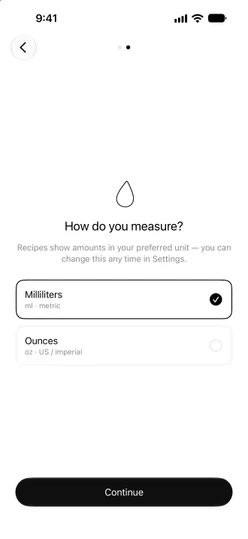
The next screen asks How do you measure?. Pick one:
Milliliters(ml · metric)Ounces(oz · US / imperial)
Sakaba preselects the one your region uses: ounces if your iPhone is set to US measurements, milliliters everywhere else. Tap Continue to keep it. To go back to the welcome screen, tap the back arrow at the top left.
Every recipe shows its amounts in the unit you choose. You can switch at any time in Settings → Measurement; see Units: ml and oz.
The Sakaba Plus screen
The last step shows the Sakaba Plus plans. Buying is optional. Tap ✕ at the top left to close it and start using the app with the free recipes.
If you buy Plus or restore an earlier purchase on this screen, setup finishes the same way. You can come back to it any time from Settings → Sakaba Plus. See Free vs. Plus and Buy Sakaba Plus.
Your starter bar
So Sakaba can show you what you can make right away, My Bar starts with 20 everyday basics ticked: gin, vodka, white rum, bourbon and tequila; lime, lemon, orange and cranberry juice; simple syrup, sugar and grenadine; soda water, tonic, cola and ginger beer; Angostura bitters, sweet and dry vermouth, and triple sec.
A note at the top of My Bar → Ingredients says We stocked a starter bar. Untick anything you don’t have and tick what you do. The note goes away once your bar is no longer the starter set, or when you tap its ✕. See Set up My Bar.
If you already use Sakaba on another device, your real bar comes down from iCloud and replaces the starter set. It can take a moment to arrive.
No account
Sakaba has no sign-up and no login. Your recipes, journal, favorites and bar sync through the iCloud account already on your device. See iCloud sync.
Good to know
- Language. Setup doesn’t ask for a language. Sakaba follows your device’s language until you choose one in
Settings → Language. See Languages. - Reminders. On a later visit, Sakaba may ask once whether you’d like weekend reminders. It never asks on the first launch. See Weekend reminders.
- Setup runs once. After you finish it, it doesn’t come back on that device. Deleting and reinstalling the app shows it again.
Questions? Write to sakabaapp@proton.me.