
All articles
Help Center Making drinks
Guided mixing
Make any recipe one step at a time, with each amount shown at the step that pours it and the screen kept awake until you’re done.
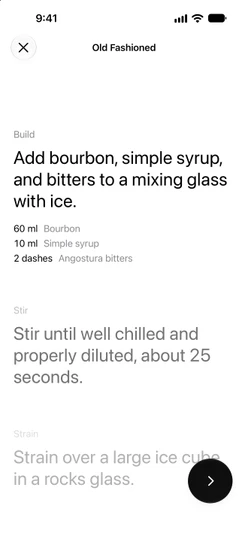
Guided mixing walks you through a recipe one step at a time, in large text you can read from across the counter. Every amount appears at the step where you pour it, in your unit, so you never have to scroll back to the ingredient list with a jigger in your hand.
Start mixing
Open any recipe and tap Start mixing at the bottom of the page. Guided mixing opens full screen; tap ✕ at the top left to leave it at any time.
Start mixing only appears on recipes that have steps. If you write your own recipe without steps, there is nothing to guide, so the button stays hidden.
Move between steps
Each step is labelled with what you do in it, such as Build, Shake, Strain or Garnish, or simply Step 2 when it has no label. To move on:
- Tap the round button at the bottom right. Its ring fills as you go through the recipe.
- Drag the steps up or down.
- Tap a faded step above or below to jump straight to it.
Your iPhone gives a light tap of haptic feedback at each step.
Amounts at the right step
Each ingredient’s amount is shown at the step that pours it, and only there, so every amount appears exactly once. Optional ingredients carry an Optional tag.
The amounts are the recipe as you set it up on its page. If you changed the servings or adjusted an ingredient, guided mixing uses those amounts, in milliliters or ounces as set in Settings → Measurement. See Servings and scaling.
Finish and log the drink
The last step is Enjoy: “Your drink is ready. Cheers!” The round button becomes a checkmark; tap it to close guided mixing.
To remember how it went, tap How was it? under the last step instead. It opens a new tasting journal entry for the drink with the recipe as you poured it already filled in. On the free tier, once you have 3 journal entries, it opens Sakaba Plus instead.
The screen stays awake
Your iPhone won’t dim or lock while guided mixing is open, so you can keep your hands on the shaker. It goes back to your usual Auto-Lock setting as soon as you close it.
Good to know
- There are no timers. A step may say how long to shake or stir, but nothing counts down; keep your own pace.
- It starts from the first step. Guided mixing doesn’t remember where you stopped; closing it and starting again begins at step 1.
- VoiceOver. The step control is adjustable: swipe up or down with one finger to go to the next or previous step.
- Plus recipes. Guided mixing works on every recipe you can open: the 80 free recipes, your own, and the whole library with Sakaba Plus.
Questions? Write to sakabaapp@proton.me.
From the blog
- 10 Whiskey Cocktails You Need to Know From a three-ingredient Manhattan to a hot mug of Irish Coffee — ten classic whiskey drinks, with exact ratios, across bourbon, rye, and Scotch.
- 10 Gin Cocktails Every Home Bartender Should Know From the bone-dry Martini to the herbal Southside — ten classic gin cocktails, with exact ratios, worth having in your back pocket.
- Built vs. Muddled: The Two Techniques Beginners Skip No shaker, no strainer, sometimes not even a mixing spoon. The two easiest ways to make a cocktail are also the most overlooked.