
All articles
Help Center Sakaba Plus
Manage or cancel your subscription
Switch between monthly and yearly billing, cancel, move to Lifetime, or ask Apple for a refund.
Apple runs Sakaba Plus subscriptions, so you change or cancel them with Apple’s own tools. You can reach them from inside Sakaba or from your iPhone’s Settings.
Manage it from Sakaba
- Tap the gear at the top left of Home to open Settings.
- Tap
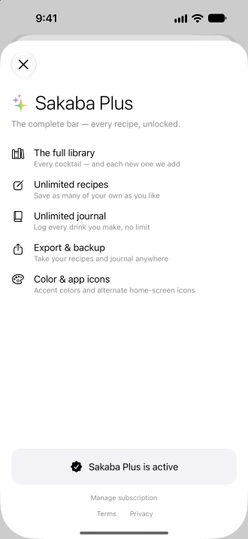
Sakaba Plus. The row readsActivewhile you have Plus. - Tap
Manage subscription.
Apple’s subscription sheet opens. From there you can switch plans or cancel.
Manage subscription appears only for Monthly and Annual. A Lifetime purchase has nothing to renew, so there’s nothing to manage.
Manage it from iOS Settings
Open the Settings app, tap your name, then Subscriptions, and choose Sakaba. This works even if Sakaba isn’t installed.
Cancel
Cancel in Apple’s subscription sheet. Cancelling stops the next renewal. You keep Plus until the end of the period you’ve already paid for.
When that period ends, Plus turns off the next time Sakaba comes back to the screen. If you open it fresh and Plus still shows, switch to another app and back. Your own recipes and journal entries stay; Plus recipes lock again, and the accent color and app icon go back to the defaults. See Free vs Sakaba Plus for exactly what changes.
Deleting Sakaba doesn’t cancel a subscription. Cancel it in Apple’s subscription sheet.
Switch between Monthly and Annual
Both plans are in the same subscription, so you switch in Apple’s subscription sheet: choose the other plan and confirm. Apple decides when the change takes effect and handles any difference in price.
Move to Lifetime
While a subscription is active, the Sakaba Plus page shows Sakaba Plus is active instead of the plans, so Lifetime can’t be bought on top of it. To move to Lifetime:
- Cancel your subscription.
- Wait for the paid period to end and Plus to turn off.
- Open
Settings → Sakaba Plus, chooseLifetimeand tapBuy once.
This way you never pay for both at once.
Refunds
Apple handles all refunds under its own policies. Request one at reportaproblem.apple.com. If a refund is granted, Plus turns off in Sakaba.
Good to know
- Price changes. If a subscription price changes, Apple tells you in advance.
- The fine print. Renewal and cancellation terms are in the Terms of Use.
Questions? Write to sakabaapp@proton.me.