
All articles
Help Center Making drinks
Shake to mix
Can’t decide what to make? Tap Surprise me, give your phone a shake, and Sakaba pours you a random cocktail.
When you can’t decide what to make, let Sakaba choose. Tap Surprise me, shake your phone like a cocktail shaker, and a random drink is poured for you.
Start it
Surprise me is in two places:
- Home, right under the cocktail of the day.
- My Bar →
Cocktails, under theReadyheading, once more than 5 drinks are ready to make from your bottles. See What can I make?.
Shake
A shaker fills the screen, with Shake to mix under it. Shake your phone: the shaker wobbles, you feel a tap with every shake, and it fills as you go. When it’s full, your drink is poured.
Rather not shake? After a couple of seconds a Reveal button appears at the bottom; tap it to skip straight to the drink.
Your cocktail
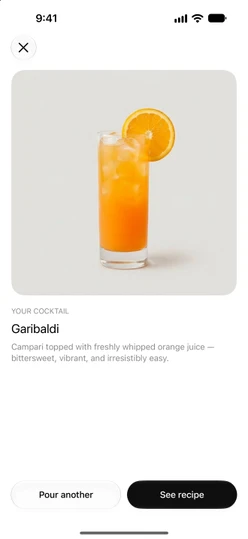
The drink appears with its photo, name and summary under Your cocktail. Then:
Pour anotherpicks a different drink right away, without shaking again. It never shows the same drink twice in a row, unless there’s only one to choose from.See recipecloses the shaker and opens the recipe.✕at the top left closes the shaker without opening anything.
Which drinks it picks
The pick is random every time, unlike the cocktail of the day, which is the same for everyone all day.
- From Home, Sakaba picks from every recipe you can open: the 80 free recipes and your own. With Sakaba Plus, the whole library is in the mix.
- From My Bar, it picks only from your
Readylist: the drinks you can make right now with what you have. Drinks underReady with a swaparen’t included. Without Plus, it sticks to the free recipes on that list. If every ready drink needs Plus, it picks from all of them, andSee recipeshows the Plus sheet instead of the recipe.
Good to know
- VoiceOver. The
Revealbutton is there from the start, and the drink’s name is announced when it’s poured. - Reduce Motion. The shaker stops wobbling and the reveal fades in, but everything else works the same.
- No motion sensor? On a device that can’t detect a shake, the screen says
Hold to mix: press and hold the button to fill the shaker, and let go early to drain it. With VoiceOver or Switch Control on such a device, it saysTap to mixand you useReveal. - Siri can surprise you too. Say “Random cocktail in Sakaba.” See Siri and Shortcuts.
Questions? Write to sakabaapp@proton.me.