
All articles
Help Center Making drinks
Flavor profile
Read a drink’s taste at a glance, watch it shift as you change the recipe, and find drinks that taste alike.
The Taste chart on a recipe shows how sweet, sour, bitter and boozy a drink is, so you can tell what you’re in for before you pour. It also powers the Similar drinks at the bottom of the page.
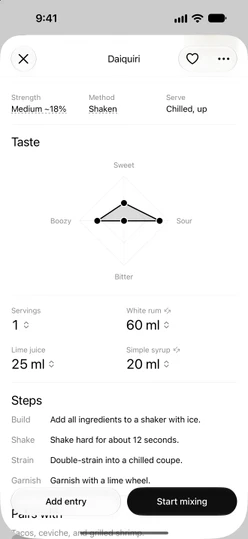
Read the chart
The chart has four points: Sweet, Sour, Bitter and Boozy. Each one runs from 0 at the center to 5 at the edge, and the shape between them is the drink’s profile. A Daiquiri, for example, is sweet 2, sour 4, bitter 0 and boozy 3: a shape that leans toward Sour, with nothing on Bitter.
Every recipe in the catalog comes with its own profile.
Watch it change as you adjust
Change an ingredient’s amount and the chart reshapes, live, while you drag the ruler. Add more lime juice to a Daiquiri and it leans further toward Sour; add more syrup and it turns sweeter. The strength estimate above it moves at the same time.
Changing only the servings doesn’t move the chart, because every proportion stays the same. To get back to the original shape, tap ↺ at the top of the recipe, then Reset. See Servings and scaling.
It’s an estimate
The shifts are calculated from the recipe’s proportions and the typical taste of each kind of ingredient, not measured from a real drink. Your own bottles may taste a little different, and that’s fine: use the chart as a guide to how a change will push the balance.
Your own recipes
When you create a recipe, you set its profile yourself in the editor’s Taste section: drag each of the four points to where you think it belongs. See Create your own recipe.
If you leave all four at 0, the recipe page shows no Taste chart and no Similar drinks.
Similar drinks
At the bottom of a recipe, Similar lists the three drinks whose profiles are closest to this one. When several are about as close, Sakaba prefers ones with a different base spirit, both from this drink and from each other, so the list doesn’t end up as three versions of the same thing.
- Each row shows the drink’s base spirit and strength. Tap it to open the recipe, or touch and hold it for
Add to favoritesandOpen. - The list can include your own recipes, and recipes marked ✨ that need Sakaba Plus.
- It’s based on the recipe as written, not on the amounts you changed.
Good to know
- VoiceOver reads the chart as
Flavor profile, followed by the four values, such as “Sweet 2, sour 4, bitter 0, boozy 3, out of 5.” - Large text. At the largest accessibility text sizes, the chart’s labels stop growing so they stay on screen. Touch and hold the chart to see the reading in large text.
- Reduce Motion. With Reduce Motion on, the chart changes shape without animating.
- By taste on Home uses these same profiles to group drinks. See Collections and seasonal shelves.
- Your accent color. The chart is drawn in your accent color.
Questions? Write to sakabaapp@proton.me.